# Point to Site VPN Configuration

## Step 1: Prerequisites

* Create a private network (VPC) without a router via Horizon.
* Navigate to Project → Network → Networks → Create Network.
* Example: Subnet - 192.168.7.0/24, Gateway IP - 192.168.7.1.

![](/files/81c954b29a22dac796cfa2de6b9c68b80c24968e)

![](/files/2754778e15cdb9a52e24596ad3dc1b0ec37cf5dd)

![](/files/6a80e0d7d9103b0e355ddd6c98fe7680ee260a16)

## Step 2: Create a Security Group

* Navigate to Project → Network → Security Group → Create Security Group.
* Allow any protocol for the pfSense Server.

![](/files/9cd40329ae4f2fbc62a876e8bd954913d21a6f7a)

## Step 3: Create a pfSense Server

* Attach both Public and Private Interfaces (e.g., Server-0).
* Assign the gateway IP.
* Disable port security of the Private Interface.

![](/files/4c6a65a19c0686bde2c6e46bc91de6f97b59708e)

![](/files/790bfa99a1f56a341ebd62412a60c8c8d726d327)

## Step 4: Configure pfSense Interfaces

* Set up the LAN and WAN interfaces inside pfSense Server.

![](/files/ce0649f676adcaa38e26adc178238c098b0c5d8a)

## Step 5: Create a Temporary Windows Server

* Create a Windows Server with a private interface (e.g., Server-1).

![](/files/121d58761990b6fc809eb1fb8788f5e5d9c3ade4)

## Step 6: Access pfSense WebGUI

* Log in using the default username and password.

![](/files/1c153f98459e6a8f8509941464891d7346e1b360)

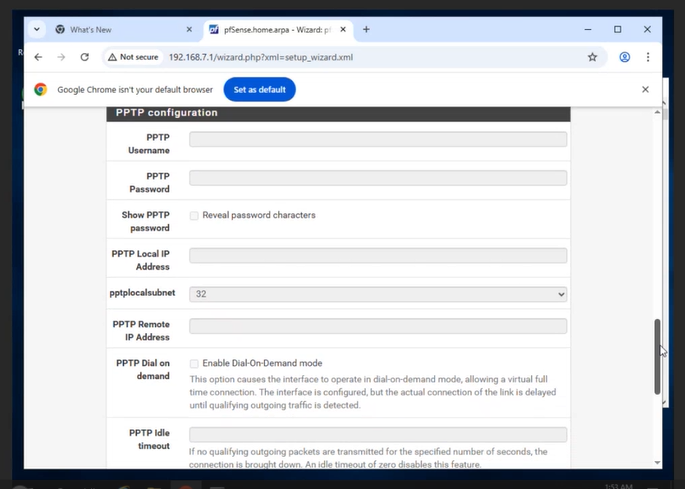
## Step 7: Initial pfSense Setup

* Complete the basic setup wizard as shown in the images.

![](/files/71244e940c459f6d6fb90ea6a3d139920d19ceb8)

![](/files/b89ae4909a1edf8a6e76498ae8577b95fb5afbf9)

<figure><img src="/files/r7E3fsLm7HAKv6wc7Nmd" alt=""><figcaption></figcaption></figure>

<figure><img src="/files/UVB1Tokk8EM44ivY5kNo" alt=""><figcaption></figcaption></figure>

<figure><img src="/files/MKJEGM2GiWS2rw66npE4" alt=""><figcaption></figcaption></figure>

<figure><img src="/files/d27SGzhQNli9anZsK4jC" alt=""><figcaption></figcaption></figure>

<figure><img src="/files/PDATCzzqVZMJcfcOSiU6" alt=""><figcaption></figcaption></figure>

<figure><img src="/files/i7SVQYBjKjGGCMg6zx5H" alt=""><figcaption></figcaption></figure>

<figure><img src="/files/zJY2civDI00zwAA85rfG" alt=""><figcaption></figcaption></figure>

<figure><img src="/files/x99g4PTt6G1UCMXMyi9o" alt=""><figcaption></figcaption></figure>

<figure><img src="/files/ZmbFklVOJvjRYkjqxZkt" alt=""><figcaption></figcaption></figure>

<figure><img src="/files/VujE0kyXFTHvSHvJMqqA" alt=""><figcaption></figcaption></figure>

<figure><img src="/files/1OWnGOP0gM9c5yIxLcqF" alt=""><figcaption></figcaption></figure>

<figure><img src="/files/VVBg9aJzn6PS8SjHDQbX" alt=""><figcaption></figcaption></figure>

## Step 8: Set Up Certificates and OpenVPN Server

* Navigate to VPN → OpenVPN → Servers → Wizards.
* Tunnel Network: 192.168.8.0/24.
* Local Network: 192.168.7.0/24.
* Edit the server settings as needed.

<figure><img src="/files/6skNO4Wf4gIZjQuiXzmP" alt=""><figcaption></figcaption></figure>

<figure><img src="/files/vNoRsN8730FdVbVONzCt" alt=""><figcaption></figcaption></figure>

<figure><img src="/files/oJELKR5cM1QSXkgcZQz4" alt=""><figcaption></figcaption></figure>

<figure><img src="/files/qTm5ZDJ27zbJjOwBmeF5" alt=""><figcaption></figcaption></figure>

<figure><img src="/files/umevTogDt1RcmTyudyQQ" alt=""><figcaption></figcaption></figure>

<figure><img src="/files/ybNdSUgoLo0zIqh3fj8c" alt=""><figcaption></figcaption></figure>

<figure><img src="/files/6CNyBKVVOaKuJYkFLzEp" alt=""><figcaption></figcaption></figure>

<figure><img src="/files/pYQ5A27CznsdDACJcGol" alt=""><figcaption></figcaption></figure>

<figure><img src="/files/upnisyqDRLdylL5YRyPq" alt=""><figcaption></figcaption></figure>

<figure><img src="/files/mI5HnQHv1uE0YbCd08bf" alt=""><figcaption></figcaption></figure>

<figure><img src="/files/sBY7synnUAht7pbmgG6W" alt=""><figcaption></figcaption></figure>

<figure><img src="/files/lb2qYr7YZTvQ5ab5nfGG" alt=""><figcaption></figcaption></figure>

<figure><img src="/files/XQdIVQgZS1M3SjMrabro" alt=""><figcaption></figcaption></figure>

<figure><img src="/files/NPZNAp7BgTpsKOp8mohZ" alt=""><figcaption></figcaption></figure>

<figure><img src="/files/YBUbcuA0mZlxCr4pr01M" alt=""><figcaption></figcaption></figure>

<figure><img src="/files/BEyQZkUeMQfs9J5HQkhc" alt=""><figcaption></figcaption></figure>

<figure><img src="/files/BbP0Y0vpUdfo9CVhVp1e" alt=""><figcaption></figcaption></figure>

## Step 9: Install OpenVPN Client Export Package & Create Users

* Install 'openvpn-client-export' from System → Package Manager → Available Packages.

<figure><img src="/files/ycSO2quIq78sv4jr0aYo" alt=""><figcaption></figcaption></figure>

* Navigate to VPN → OpenVPN → Client Export to download the bundled configuration archive.

<figure><img src="/files/9OohDqAsY8nevc0SMbod" alt=""><figcaption></figcaption></figure>

<figure><img src="/files/gnVMvjKGU45f5vnOAIGw" alt=""><figcaption></figcaption></figure>

<figure><img src="/files/UpfF229EHwMXH51fWYDH" alt=""><figcaption></figcaption></figure>

* Ensure you have a user account set up with a user certificate created. This can be completed by  \
  selecting System > User Manager > Add. Select a username and Password, then click to create a  &#x20;user certificate. Give the certificate a name and ensure that the OpenVPN\_CA that we created earlier is  &#x20;selected. Leave the rest as default and save.

<figure><img src="/files/s56hzCLMA1wuquNtIzeC" alt=""><figcaption></figcaption></figure>

## Step 10: Set up OpenVPN Client

* On Browser search “OpenVPN Connect Download” and download the “Download.msi” file and install it.

<figure><img src="/files/muO7noEYzmi2J7osgicv" alt=""><figcaption></figcaption></figure>

* Launch OpenVPN Connect and upload the configuration file.

<figure><img src="/files/wxVepO5QVRGoTVdyqrHa" alt=""><figcaption></figcaption></figure>

<figure><img src="/files/quRFu1JOdKMHGAjJ9u9o" alt=""><figcaption></figcaption></figure>

* Enter the username and password associated with the certificate.

<figure><img src="/files/QZtAQa5FaKNXEKWxlV7X" alt=""><figcaption></figcaption></figure>

* Click 'Continue' to establish the connection.

<figure><img src="/files/V73sK3UMYBT8ZxPwELAI" alt=""><figcaption></figcaption></figure>

<figure><img src="/files/GFoMZBggwG2KU0vdsLCI" alt=""><figcaption></figcaption></figure>

## Step 11: Final Testing

* From the OpenVPN client, ping the pfSense LAN IP to verify connectivity.
* Verify VPN tunnel operation (client gets IP from 192.168.8.0/24).
* Ensure correct routing between VPN subnet (192.168.8.0/24) and LAN subnet (192.168.7.0/24).
* Confirm pfSense LAN interface (192.168.7.1) is reachable and responding.


---

# Agent Instructions: Querying This Documentation

If you need additional information that is not directly available in this page, you can query the documentation dynamically by asking a question.

Perform an HTTP GET request on the current page URL with the `ask` query parameter:

```
GET https://docs.acecloud.ai/knowledge-base/tutorials/point-to-site-vpn-configuration.md?ask=<question>
```

The question should be specific, self-contained, and written in natural language.
The response will contain a direct answer to the question and relevant excerpts and sources from the documentation.

Use this mechanism when the answer is not explicitly present in the current page, you need clarification or additional context, or you want to retrieve related documentation sections.